 Help
Numbers, then Number Ports, shows every number moving on or off your account.
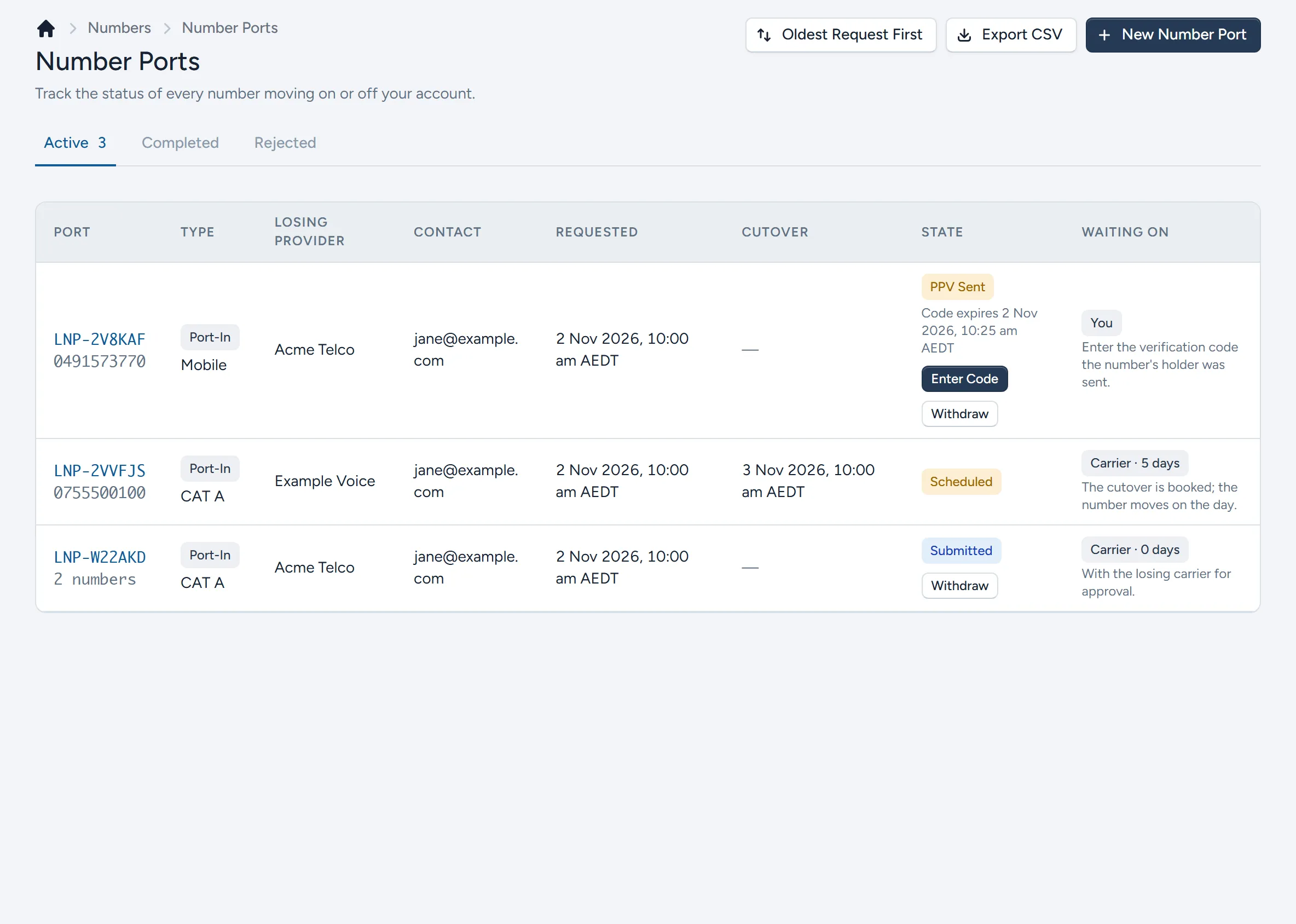
The tabs split them up: Active for ports still in progress, Completed and Rejected. Each row shows the Port, the Type, the Losing Provider, the Contact, when it was Requested, the Cutover, the State and Waiting On. Port is the port’s reference, with its numbers under it. Type is Port-In or Port-Out, with the kind of port under it.
Waiting On says who has to act next and what happens next.
| Waiting On | When |
|---|---|
| You | A mobile port’s verification code needs entering. |
| Carrier | The losing or gaining carrier has it. The row shows the days since it went to them. |
| Check Networks | We check, lodge or book it. |
The list shows the newest request first. Oldest Request First, at the top, turns it round, and Newest Request First turns it back. Export CSV downloads the list, with each date in your account’s time zone.
Every port has a reference such as LNP-7K4MQX. It is on the port’s page and
in every email we send about it. Quote it when you contact support.
States
| State | What it means |
|---|---|
| Awaiting Authority | Sent to the number’s holder to confirm the porting authority. It is lodged once they do. See Sending the porting authority to the number’s holder. |
| Requested | We have your request. |
| Submitted | Lodged with the losing carrier. |
| Confirmed | The losing carrier has accepted it. |
| Scheduled | A cutover date is set. |
| PPV Sent | Mobile only: a verification code has gone to the number. See Confirming a mobile port. |
| PPV Validated | Mobile only: the code has been entered. |
| Submitted Upstream | Mobile only: lodged with the losing carrier. |
| Activated | The number is live on our network and rings where you chose. |
| Rejected | The losing carrier refused it. See Port rejections. |
| Cancelled | Withdrawn, by you or by us. |
| Port-Out Requested, Port-Out Approved, Ported Away | A number leaving your account. See Port-outs below. |
A port’s page
Select a port’s reference to open it. Port Order shows its reference, its state, the cutover, the port type, the losing provider, the contact, and the carrier’s reference. In place of the cutover it can read “Not scheduled yet”, with the date you asked for. History lists each step with its date.
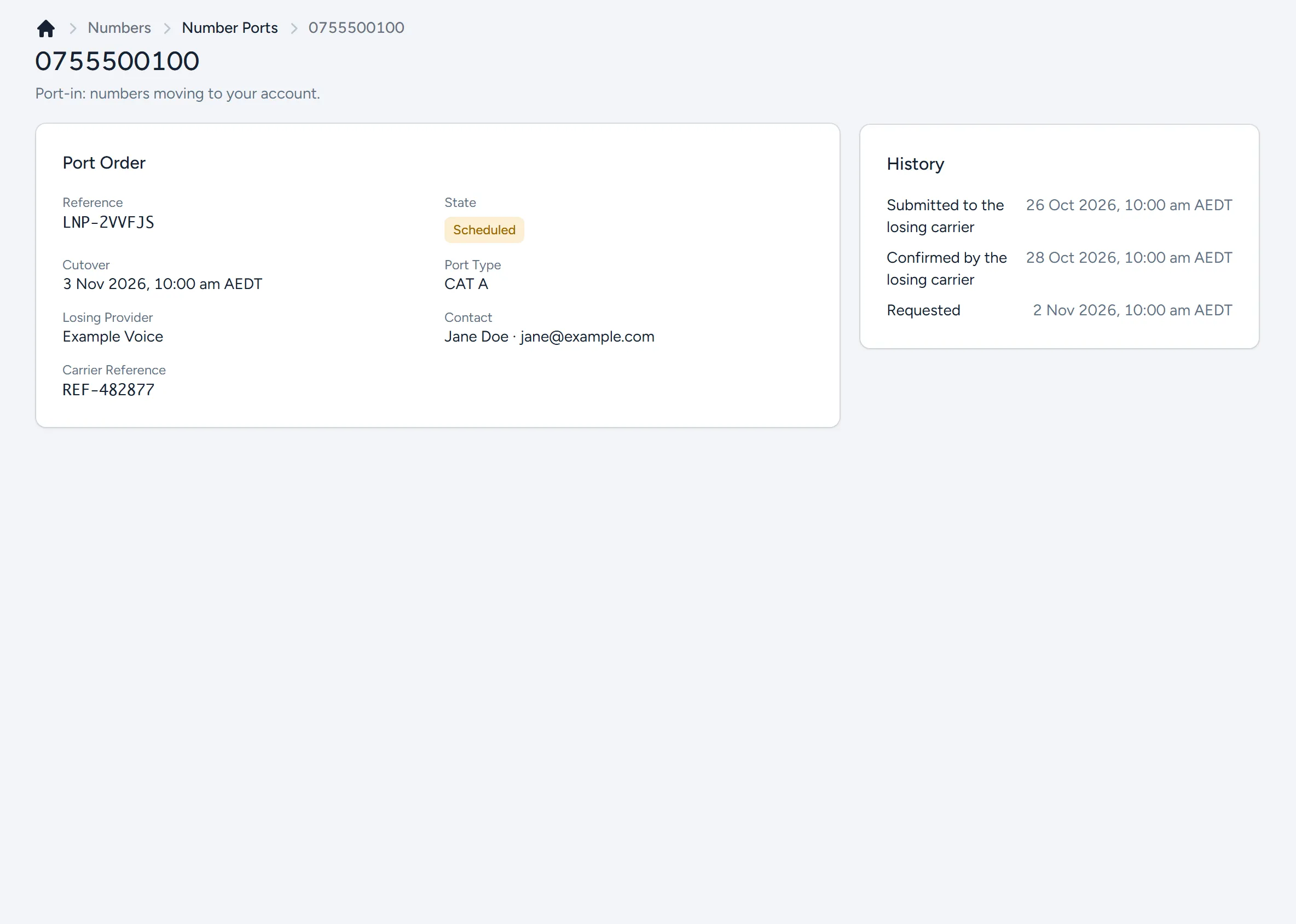
A rejected port shows Why It Did Not Go Ahead, with the carrier’s reason. A mobile port waiting on its code shows Waiting for the Verification Code. See Confirming a mobile port. A port-out shows Handled by Our Team and the Gaining Carrier.
We email the port’s contact at each step, and when the number is live.
Port-outs
When another provider takes one of your numbers, the port shows with the direction Port-Out. It is handled by our team and the gaining carrier, and there is nothing for you to do. If you didn’t expect it, contact support before the cutover.
We email you at each step. If the number belongs to one of your end users, we email them too, so they can speak up if they didn’t ask for it. Their email carries your name, logo and support details, and replies go to you. It never mentions Check Networks.
Withdraw a port
Withdraw, on the port’s row in Number Ports, stops a port that is still Awaiting Authority, Requested, Submitted, Confirmed, PPV Sent or PPV Validated. It isn’t on the port’s own page. It can’t be undone. To port the number later, request a new port.
Through the API
Everything on these pages is in the API too, under Number Ports.
GET /portslists ports in and out with the same tabs and export.GET /ports/{reference}reads one with its history and who it is waiting on.POST /portsrequests a port-in.POST /ports/{reference}/withdrawwithdraws one.POST /ports/{reference}/confirmconfirms a mobile port’s code, andPOST /ports/{reference}/verification-codesends it again.
Each step also arrives as an order.statusChanged
webhook, and port.actionRequired tells you when
a port waits on you.