 Help
The sandbox is a separate copy of the platform for building and testing your integration. It runs the same API and the same Wholesale Portal as production, but nothing in it ever reaches a carrier. Qualifications, orders and their progress are answered by the sandbox itself, in the carriers’ own formats, and nothing you do there is billed.
| Production | Sandbox | |
|---|---|---|
| API | https://api.checknetworks.tools/v2 |
https://api.checknetworks.dev/v2 |
| Portal | your usual Wholesale Portal | https://portal.checknetworks.dev |
Getting a sandbox
An Owner or Admin makes one. Go to Company Settings, then Integrations, then API Keys in the production portal and choose Create Sandbox. It is set up for your account and your portal users are copied across, with their names, emails and roles but no passwords. To sign in, choose Open Sandbox on the same page. It signs you in to the sandbox as the same user.
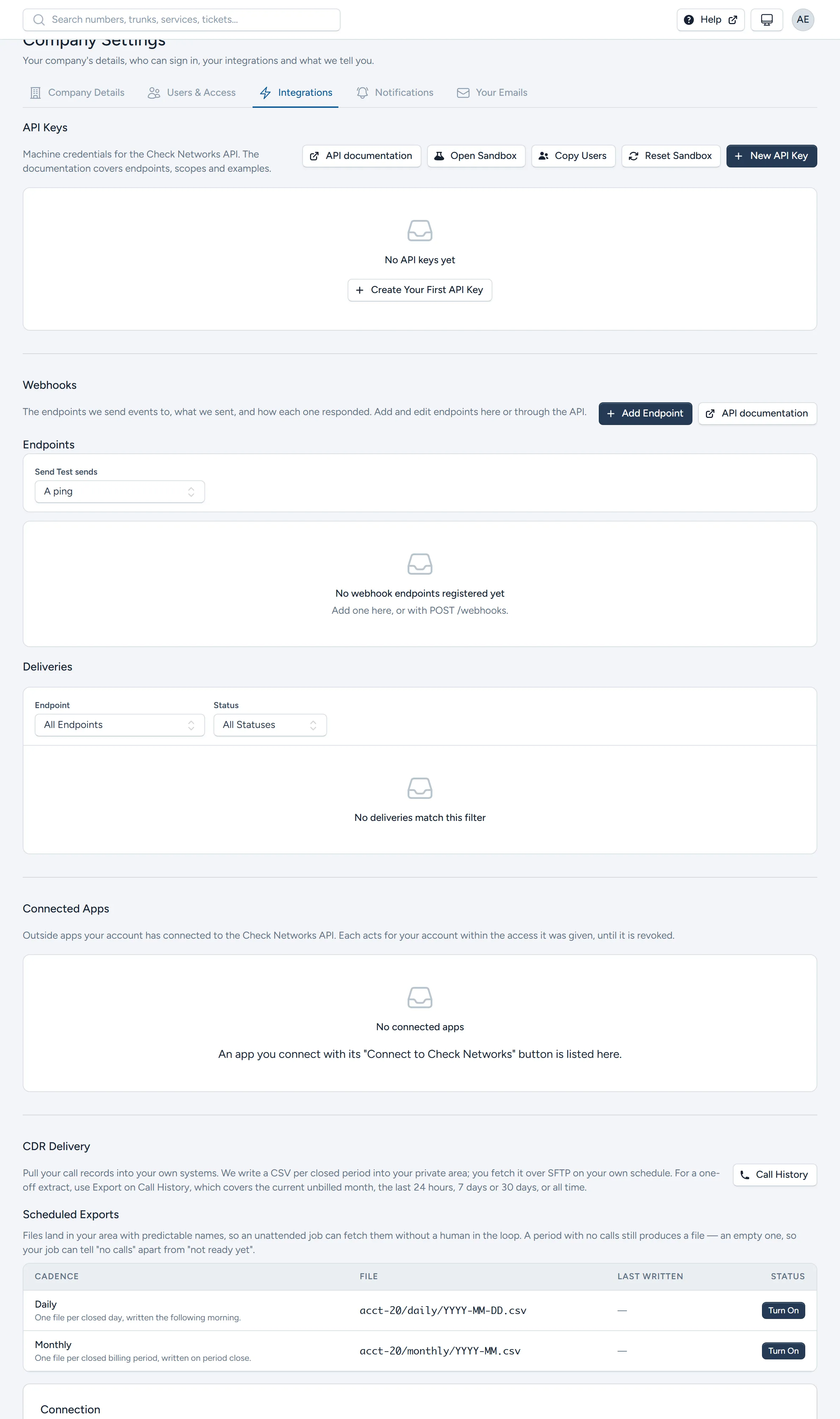
The link works once and only for a minute, so open it again from the production portal each time.
Open Sandbox needs two-factor authentication. It works only when you signed in to the production portal with your two-factor code. That sign-in counts for the sandbox too, so the sandbox does not ask for a code again. If you have not turned two-factor on, set it up under Profile, then sign out and sign in again before opening the sandbox. A sign-in from before you turned it on does not count.
A user added to production after the sandbox was set up can sign in once an Owner or Admin chooses Copy Users there.
Your sandbox account is yours alone. Its API keys, services, orders and
webhooks are separate from production and from every other customer’s
sandbox. Create sandbox API keys in the sandbox portal, the same way as in
production, except that the sandbox never asks for your password: you have
none there. See API keys and scopes. A production key does
not work in the sandbox, and a sandbox key does not work in production. Ask
the sandbox for its tokens, at
https://api.checknetworks.dev/v2/oauth/token.
You can tell the two apart at a glance. A sandbox secret starts cn_test_
and a production one cn_live_, and GET /ping answers environment: sandbox or environment: live.
An OAuth app can be connected to your sandbox account too, once Check Networks has given the app a sandbox copy. Its consent screen is on the sandbox portal, and Connected Apps there lists it.
Addresses
The sandbox has its own set of test addresses, and your account is given 50 of each kind. Qualify one of your test addresses and the answer comes back as it would from the carrier. Any other address answers as not found. Your test addresses cover the cases worth building for:
- NBN FTTP, ready to connect, and FTTP that needs a build first
- NBN FTTP whose NTD is full: another provider’s service is on every
port, so a
POST /data/ordersconnect there waits onorder.ntdFulluntil you attach an appointment for a new NTD or name a port to take over - NBN FTTN, FTTC and FTTB, ready to connect on a spare copper pair. FTTN
and FTTC also say
upliftAvailable, for trying a Fibre Uplift (install: "fibreUplift"onPOST /data/orders) - NBN HFC and fixed wireless, ready to connect
- NBN not serviceable
- Opticomm, with the address’s real service class
There are no satellite addresses: we do not sell on NBN satellite.
A serviceable address lists the plans you can order there in
availablePlans, the same plans and prices as production. Every sandbox
NBN address reports the same POI, 0SND, which no real address has.
The /nbn qualification, address and planning answers come in NBN’s own
shape, as from Kinetix. Each ready NBN address also has another provider’s
service on it: on port 1 of the NTD, or on the second copper pair. The
first pair is spare. To test a transfer, qualify it with that service’s
AVC, which is AVC followed by the LOC’s twelve digits, and a
customerAuthorityDate. The port or pair comes back with
serviceIDMatch: true. Any other AVC answers NBN’s RJ002003. A ready FTTP
address’s NTD cannot carry Home Hyperfast, so its planning record says
the upgrade needs a new NTD.
An Opticomm address answers as Opticomm does for its service class, and your addresses include every class in the sandbox:
| Class | Opticomm answers | Use it to test |
|---|---|---|
| 1 | Rejected |
an address you cannot order |
| 2 | Serviceable - Shortfall, no OTD yet, a Standard Install and the new connection charge |
an order that needs an install appointment |
| 3 | Serviceable, an OTD with port D1 in use, Service Restoration or Additional Install, and Service Transfer |
a connect with no install, an Additional Install, a transfer |
| 5 | Serviceable, an OTD, the new developments charge |
an order with the developer charge |
GET /opticomm/singleSiteQualification/{opcId}?productAvailability=true
lists the bandwidth products at a serviceable address, by Opticomm’s own
product code. GET /opticomm/timeSlots answers an AM and a PM slot on each
day of the window you ask for, from tomorrow.
To get the list, sign in to the sandbox portal and go to Company Settings, then Integrations, then API Keys. Choose Test Addresses (CSV).
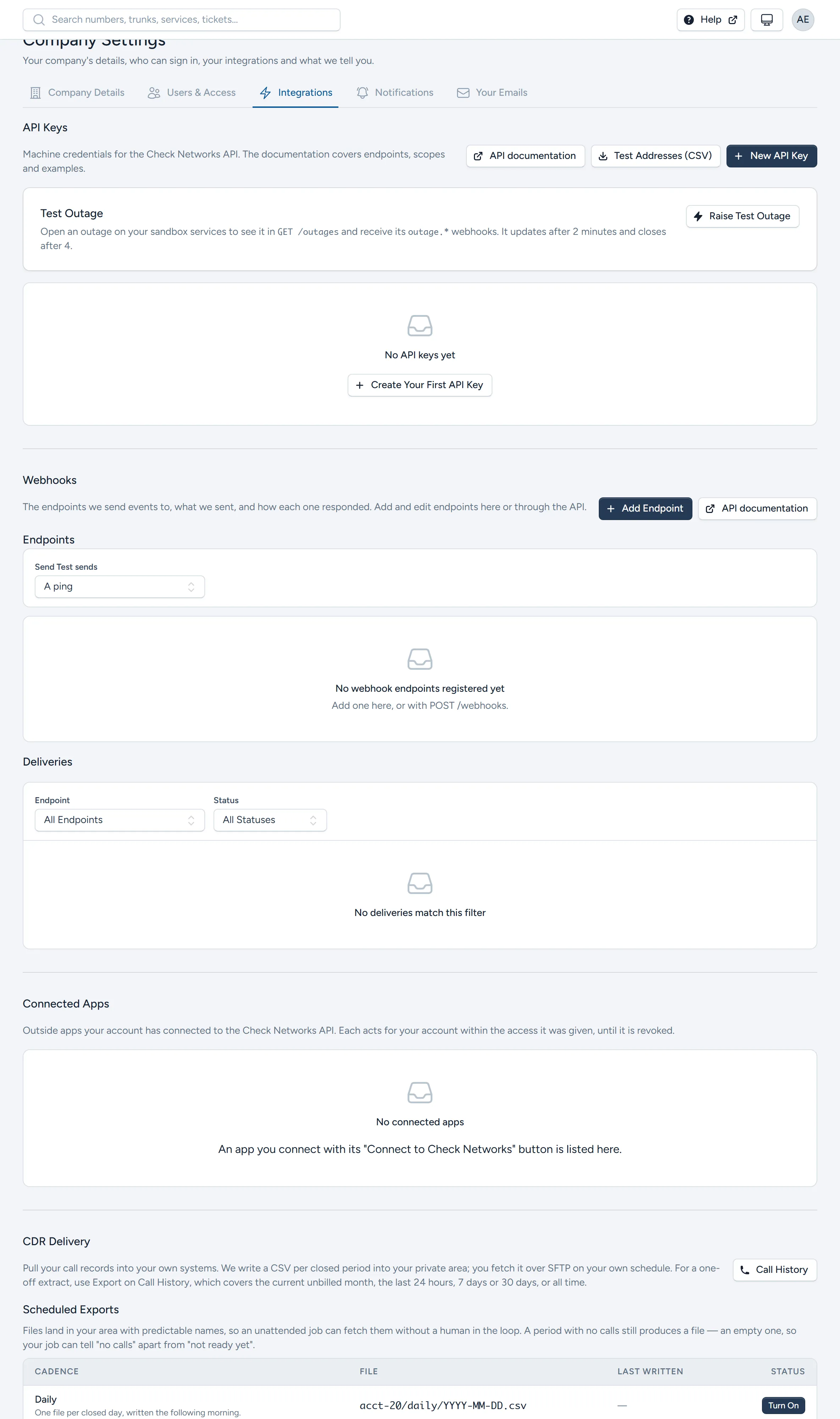
Each row gives the address, its LOC or Opticomm ID, which case it covers and its current service class. An FTTP address that needed a build shows its new class once your order has completed it. Your Account Manager can add more addresses.
Orders
An order is accepted the way the carrier accepts one, then moves through
the carrier’s own steps about a minute apart. An FTTP site that needs a
build takes a few minutes longer. Each step reaches you as it would in
production: the order’s status changes and order.statusChanged fires.
| Order | Status, step by step |
|---|---|
| Connect | accepted, in_progress, complete |
| Change or disconnect | accepted, complete |
| Cancel | cancelled |
A completed connect builds the service and fires service.provisioned. You
can then read, change and disconnect it, and those orders progress the same
way.
Making the carrier refuse, fail, cancel or delay an order
To see what your integration does when a carrier does not simply complete
an order, put one of these words in the connect’s customer reference, as a
word of its own: ACME-1042-FAIL, not ACMEFAIL. Each comes back as the
carrier’s own callback, so the order’s status changes and the webhooks fire
as they would in production.
| Word | What the carrier does | You see |
|---|---|---|
REJECT |
Refuses the order when it is placed. | The order is refused, with the carrier’s reason. |
FAIL |
Accepts it, then fails it with a reason. | accepted, then failed, with statusReason. |
CANCEL |
Accepts it, then cancels it. | accepted, then cancelled. |
DELAY |
Accepts it, then gives it a completion date a week away, then completes it a few minutes later. | accepted, in_progress, complete. The carrier order (GET /nbn/orders/product/{orderId} or GET /opticomm/productOrders/{orderId}) shows the new plannedCompletionDate. |
HOLD |
Opticomm only: accepts it, then holds it waiting on you, until you amend it with PATCH /opticomm/productOrders/{id}. |
accepted, then the order needs your action; once amended it carries on to complete. |
A change or a disconnect has no customer reference of its own, so you choose its outcome in the sandbox portal instead. Open the service, choose Next Change or Disconnect and pick one:
| Choice | What the carrier does with the service’s next change or disconnect |
|---|---|
| Accept | Goes through as usual. This is what happens when you choose nothing. |
| Reject When Placed | Refuses it when it is placed, with the carrier’s reason. |
| Fail After Acceptance | Accepts it, then fails it with a reason. |
| Delay a Week, Then Complete | Accepts it, gives it a completion date a week away, then completes it a few minutes later. |
| Hold Until Amended | Opticomm only: accepts it, then holds it waiting on you, until you amend it with PATCH /opticomm/productOrders/{id}. |
| Take It but Time Out | Takes the order, but its answer to us never arrives. On NBN the order waits as delayed while our staff confirm the carrier’s order with the carrier, then it goes on as usual. On Opticomm we find the order again by our reference and it goes on. |
| Never Answer | Never answers and does not take the order. On NBN the order waits as delayed for our staff; on Opticomm we send it again. |
The choice applies to the next change or disconnect on that service only, whichever comes first. After that order, the service goes back to Accept. Words in the connect’s reference never reach a later order.
A failed or cancelled carrier order carries the carrier’s reason in its
reasonCode. No separate event fires for a delay: in production a carrier’s
new date reaches you only on the carrier order, and the sandbox does the same.
To test an Opticomm Service Transfer, use a class 3 address: it lists
another provider’s product under supportingProduct. Order it with
transferType Service Transfer and a customerAuthorityDate no later
than today and no more than 45 days ago.
A fixed IP address on a sandbox service comes from 198.51.100.0/24, a
range set aside for documentation, so it is never a routable address.
Services
A sandbox service answers the same reads and actions as a production one: its details and session, line tests and service health checks, and appointments. A test or health check result arrives a moment later, as it does from the carrier. For appointments you can read available times, book, move and cancel.
Test outages
The sandbox network has no outages of its own. To see one, open the
sandbox portal’s API Keys page, choose Raise Test Outage and pick one
or more of your live services. A moment later an outage opens on the
postcodes of those services, so your other sandbox services in the same
postcodes are in it too. It is a full outage: it is in GET /outages and
GET /outages/{reference} with your affected services, and
outage.opened fires. Two minutes later it gets a new estimated
restoration time, and outage.updated fires. Two minutes after that it
closes, and outage.closed fires. It reaches only your account, and you
can run one at a time.
Every line test passes and every health report is healthy, unless the
service’s customer reference, which is its connect’s, has the word
FAILTEST. Then every test on it fails, with the carrier’s own failure
fields: an NBN result of Failed with what was measured, or an Opticomm
Offline with the note Failed. Its health reports come back degraded, as
Amber. Use it to build the path from a failed test to a fault ticket.
Every export (POST /exports) is written and becomes ready, unless one of
its filters has the word FAIL as a word of its own, such as
"filters": {"q": "FAIL"} on a cdrs or sms export. Then it fails as a
production export can: GET /exports/{exportId} shows state failed
with its failureReason, and export.failed fires.
Appointments
When an order names an appointment you reserved, the carrier books it a
moment after the order is placed, and appointment.booked fires. To see a
carrier change a booked visit, put one of these words in the appointment’s
notes or in the order’s customer reference. The notes are NBN
siteAccessNotes or siteAccessInstructions, or Opticomm siteAccess.
| Word | What the carrier does |
|---|---|
RESCHEDULE |
Moves the visit a day later, a moment after booking it. On NBN the appointment’s new time and appointment.rescheduled follow. Opticomm reports the move on the order, as AppointmentRescheduled, which asks you to look at the appointment. |
APPTCANCEL |
Cancels the visit, a moment after booking it: the appointment is Cancelled and appointment.cancelled fires. |
Testing your retries
To test how your integration handles a busy or failing API, send the
header CN-Sandbox-Simulate on any sandbox call, with one of:
| Value | Answer |
|---|---|
429 |
429 - Too Many Requests, code rate_limited, with Retry-After: 60 |
502 |
502 - Bad Gateway, code carrier_unavailable |
503 |
503 - Service Unavailable, code service_unavailable, with Retry-After: 60 |
The answer has the same error body as in production, and the call itself
does not run: nothing is read, written or ordered. Any other value answers
400. Production ignores the header, so it is safe to leave in code that
runs against both.
Webhook events in the sandbox
Most events fire in the sandbox as they do in production. Those that come
from calls, our live network or our staff do not. For those, send yourself
a sample with POST /webhooks/{webhookId}/test and the event’s
eventType, which delivers a made-up event of that type to the endpoint.
| Event | Fires in the sandbox | How to make it fire, or why it does not |
|---|---|---|
ticket.created |
Yes | Open a ticket. |
ticket.replied |
Yes | Add a message to one of your tickets. |
ticket.statusChanged |
Yes | Resolve or reopen a ticket with PATCH /tickets/{ticketRef}. |
ticket.csatSubmitted |
Yes | Rate a resolved ticket with POST /tickets/{ticketRef}/csat. |
ticket.informationRequired |
No | Our staff ask you for more information on a ticket. |
voice.call.completed |
No | The sandbox carries no calls. |
voice.voicemail.received |
No | The sandbox carries no calls. |
voice.recording.ready |
No | The sandbox carries no calls. |
trunk.down |
No | A trunk’s state comes from our live network, which the sandbox never reaches. |
trunk.up |
No | A trunk’s state comes from our live network, which the sandbox never reaches. |
callerId.statusChanged |
No | Our staff decide a caller ID request by hand. |
voice.hold.placed |
No | A hold follows call spend and calling patterns, and the sandbox carries no calls. |
voice.hold.released |
No | A hold follows call spend and calling patterns, and the sandbox carries no calls. |
number.assigned |
Yes | Assign one of your sandbox numbers to a trunk. |
number.unassigned |
Yes | Take a number off its trunk. |
number.released |
Yes | Release a number; it fires when the release runs. |
number.suspended |
No | Our staff suspend a number. |
number.reactivated |
No | Our staff reactivate a number. |
ipnd.recordRejected |
No | The sandbox never sends records to the IPND. |
trunk.planChangeScheduled |
Yes | Move a trunk to a smaller plan or fewer channels: the change is booked for the next billing date. |
trunk.planChangeCancelled |
Yes | Cancel a booked trunk plan change. |
trunk.planChanged |
Yes | Move a trunk to a larger plan, which takes effect at once. |
bookedChange.applied |
Yes | A booked trunk plan change takes effect on the 1st of the month. |
bookedChange.cancelled |
Yes | Cancel a booked trunk plan change. |
bookedChange.failed |
Yes | Book a data disconnect for a later day and choose Reject When Placed for the service in the sandbox portal; on its day the carrier refuses it. |
bookedChange.rescheduled |
No | Only Check Networks staff move a booked disconnect to another day, so the sandbox never does. |
invoice.issued |
Yes | Your monthly invoice is raised as in production. |
invoice.paid |
Yes | Simulate a payment that succeeds and covers the invoice. |
invoice.voided |
No | Our staff void an invoice. |
payment.received |
Yes | Simulate a payment that succeeds. |
payment.succeeded |
Yes | Simulate a payment that succeeds. |
payment.failed |
Yes | Simulate a declined payment. |
payment.reversed |
Yes | Simulate a reversal of the invoice’s last simulated payment. |
creditNote.issued |
No | Our staff issue a credit note. |
dispute.raised |
Yes | Dispute a charge on one of your invoices. |
dispute.decided |
No | Our staff decide a dispute. |
invoice.overdue |
No | Nothing is collected in the sandbox, so no invoice goes overdue. |
paymentMethod.expiring |
No | The sandbox holds no payment methods. |
credit.thresholdReached |
No | Credit is used by calls, and the sandbox carries no calls. |
credit.callsBlocked |
No | Credit is used by calls, and the sandbox carries no calls. |
credit.callsRestored |
No | Credit is used by calls, and the sandbox carries no calls. |
priceRise.noticed |
No | Our staff give notice of a price rise. |
usage.thresholdReached |
No | Usage comes from calls, and the sandbox carries no calls. |
usageAlert.triggered |
No | Usage comes from calls, and the sandbox carries no calls. |
data.realm.approved |
No | Our staff decide a realm request. |
data.realm.rejected |
No | Our staff decide a realm request. |
data.radius.sessionRetrieved |
No | A session is read from our live network, which the sandbox never reaches. |
order.statusChanged |
Yes | Every order step: place, change, disconnect or cancel an order. FAIL, CANCEL and DELAY in its reference show the carrier failing, cancelling or delaying it. |
order.delayed |
Yes | Place a delayed order, or move its submit time. |
order.appointmentRequired |
Yes | Place a connect with POST /data/orders, without an appointment, at an address that needs one (an FTTP build, or an Opticomm class 2). |
order.ntdFull |
Yes | Place a connect with POST /data/orders at one of your full-NTD test addresses, without naming a port. |
port.actionRequired |
No | The sandbox never ports a number from a real carrier. |
delegation.used |
No | The link and its code go by email, and the sandbox sends no email. |
service.provisioned |
Yes | A connect completes. |
service.suspended |
No | Our staff suspend a service. |
service.resumed |
No | Our staff resume a service. |
service.disconnected |
Yes | A disconnect completes. |
service.ceaseScheduled |
No | The sandbox carriers never schedule a cease of their own. |
diagnostic.completed |
Yes | Run a line test; FAILTEST in the service’s reference makes it fail. |
serviceHealth.reportReady |
Yes | Ask for a service health report; FAILTEST in the service’s reference makes it degraded. |
ontUpgrade.completed |
No | The sandbox never raises an ONT upgrade with the carrier. |
appointment.booked |
Yes | Place an order with an appointment: the carrier books it. |
appointment.rescheduled |
Yes | RESCHEDULE in the appointment’s notes or the order’s reference moves the visit a day later, on NBN and Opticomm alike. |
appointment.cancelled |
Yes | APPTCANCEL in the appointment’s notes or the order’s reference, or cancel a booked appointment yourself. |
outage.opened |
Yes | Raise a test outage on the sandbox portal’s API Keys page. |
outage.updated |
Yes | A test outage gets a new restoration time two minutes after it opens. |
outage.closed |
Yes | A test outage closes two minutes after its update. |
degradation.opened |
No | The sandbox network has no degradation. |
degradation.updated |
No | The sandbox network has no degradation. |
degradation.closed |
No | The sandbox network has no degradation. |
quote.completed |
Yes | Ask for an Enterprise Ethernet quote with POST /nbn/quotes. |
quote.actionRequired |
Yes | Ask for a quote with INFO in its rspReference: it is held waiting on more information. |
quote.closed |
Yes | Ask for a quote with NOQUOTE in its rspReference: the carrier cannot price it, and says why. |
endUser.spendThreshold |
No | Spend comes mostly from calls, and the sandbox carries no calls. |
endUser.creditNote.issued |
Yes | Issue a credit note on one of your end users’ bills. |
endUser.dispute.raised |
Yes | An end user disputes one of your bills. |
endUser.dispute.decided |
Yes | Decide an end user’s dispute. |
endUser.created |
Yes | Create an end user. |
endUser.updated |
Yes | Change an end user. |
endUser.suspended |
Yes | Suspend an end user. |
endUser.reactivated |
Yes | Reactivate an end user. |
sms.received |
No | SMS travels on our live network, which the sandbox never reaches. |
sms.delivered |
No | SMS travels on our live network, which the sandbox never reaches. |
sms.failed |
No | SMS travels on our live network, which the sandbox never reaches. |
fax.received |
No | Fax travels on our live network, which the sandbox never reaches. |
fax.sent |
No | Fax travels on our live network, which the sandbox never reaches. |
fax.failed |
No | Fax travels on our live network, which the sandbox never reaches. |
account.suspended |
No | Our staff suspend an account. |
account.reinstated |
No | Our staff reinstate an account. |
webhook.endpointDisabled |
Yes | One of your endpoints fails often enough to be switched off; the others hear of it. |
export.ready |
Yes | Start an export with POST /exports. |
export.failed |
Yes | Start an export with the word FAIL in a filter, such as q. |
transit.blackhole.placed |
No | A blackhole is placed on our live border routers, which the sandbox never reaches. |
transit.blackhole.released |
No | A blackhole is placed on our live border routers, which the sandbox never reaches. |
transit.blackhole.expired |
No | A blackhole is placed on our live border routers, which the sandbox never reaches. |
Some events are offered only while their product is. The event types page lists the ones you can subscribe to now.
Enterprise Ethernet quotes
POST /nbn/quotes for any LOC is acknowledged at once and priced about a
minute later, as the carrier does it over hours or days. The
quote.completed webhook fires, and the quote is then in
GET /nbn/quotes and GET /nbn/quotes/{quoteId}. Every priced sandbox
quote carries the same fibre build contribution, AUD 4,500.00, valid for 85
days.
A word in the quote’s rspReference tests the other outcomes:
| Word | What the carrier does |
|---|---|
NOQUOTE |
Cannot price it: the quote is Rejected, with the carrier’s reason in eventNote, and quote.closed fires. The location can be quoted again. |
INFO |
Holds it waiting on more information: the quote stays InProgress with subStatus Pending and the carrier’s question in eventNote, and quote.actionRequired fires. |
Numbers
Numbers bought in the sandbox portal come only from the ranges set aside
for fiction: 02 5550 xxxx, 03 5550 xxxx, 07 5550 xxxx and
08 5550 xxxx. None of them is a real number.
Call records
The sandbox carries no calls, so each trunk you make there comes with
three days of call records already on it, a moment after it is made:
local, mobile and international calls, and calls that were busy or not
answered. Every number called is one set aside for fiction, and each call
is priced with your trunk’s rates, as a real call is. Read them with
GET /voice/cdrs. They are in the same shape as production records. No
voice.call.completed fires for them. A sandbox reset removes your trunks,
and their call records with them.
Payments
To test your payment handling, open an issued invoice in the sandbox portal and choose Simulate Payment:
| Choice | What happens | Events |
|---|---|---|
| Payment Succeeds | A payment for the balance is recorded and the invoice is paid. | payment.succeeded, payment.received, invoice.paid |
| Payment Is Declined | The card is declined; the invoice stays open. | payment.failed |
| Last Payment Is Reversed | The invoice’s last simulated payment is dishonoured; the invoice is open again. Offered once a simulated payment has succeeded. | payment.reversed |
The payment is in GET /account/payments as a real one is, with the
gateway sandbox.
What the sandbox does not do
- No email. Nothing the sandbox does sends an email. Use webhooks to follow your orders.
- No live network. A trunk’s registration state, live call sessions,
sending SMS, resending a mobile port’s verification code and sending a
fax act on our live network, so in the sandbox they answer
501with the reason. So does subscribing an address to outage notices, which sends a real person a confirmation. The sandbox carries no calls, so the live call list is empty. - No Xero. The
/integrations/xeroroutes and an end user’s Xero contact link call your own Xero organisation, so in the sandbox they answer501with the reason. - No real payments. Invoices are raised as in production, but nothing is ever collected. Use Simulate Payment instead, as above.
Resetting the sandbox
A reset wipes your sandbox account’s orders, services, bills and callbacks
and starts its test addresses again, so a test run starts clean. Its users,
API keys and addresses are kept. An Owner or Admin resets it with Reset
Sandbox on API Keys in the production portal. Your tests can reset it
with POST /sandbox/reset on the sandbox API, which needs
account:update.
A sandbox can be reset 3 times in any 24 hours, from the portal and the API
together. Past that, the portal says when the next reset is allowed and the
API answers 429 with Retry-After, the seconds until then.