 Help
Connecting Enterprise Ethernet (EE) to a premises can need new fibre built to it. Before you order, ask NBN what that build would cost. That cost is the fibre build contribution, or FBC. NBN works the quote out over hours or days, and the price holds for a set time.
Request a quote
- Qualify the address.
- On the Enterprise Ethernet card under Available Services, choose Request Quote.
The card then shows Quote Pending… until NBN has priced it. If you ask again while it is pending, or while a priced quote is still in date, you get that quote back. NBN is not asked twice.
A build cost belongs to the premises, not to you. If someone else already has an in-date quote there, you are shown that one.
When it is ready
You are told when NBN finishes with your quote. You get an email if EE Quote
Updates is on under Data Services in your
notification settings. It is on unless
you turn it off. You get a webhook if you subscribe to the quote.* events.
See Webhook event types.
| You hear | What it means | What to do |
|---|---|---|
| EE quote ready | NBN has priced the build. | Open it from NBN Quotes, or choose View Quote on the SQ card. |
| EE quote needs your action | NBN has put the quote on hold until it hears more, and gives its reason. The card shows Quote: Action Required. | Contact support with what NBN asks for, and we will pass it on. |
| EE quote closed | NBN rejected or cancelled the quote, or it lapsed before it was priced. | Request a new quote from the SQ card. |
Read your quotes
Go to Services, then NBN Quotes. The page, NBN Enterprise Ethernet Quotes, lists every priced quote for your account that is still in date, soonest to expire first. With none, Check Availability starts a site qualification to request one.
Search finds a quote by address, LOC, quote ID or your reference. POI and Build Category narrow the list. Select a column heading to sort by it.
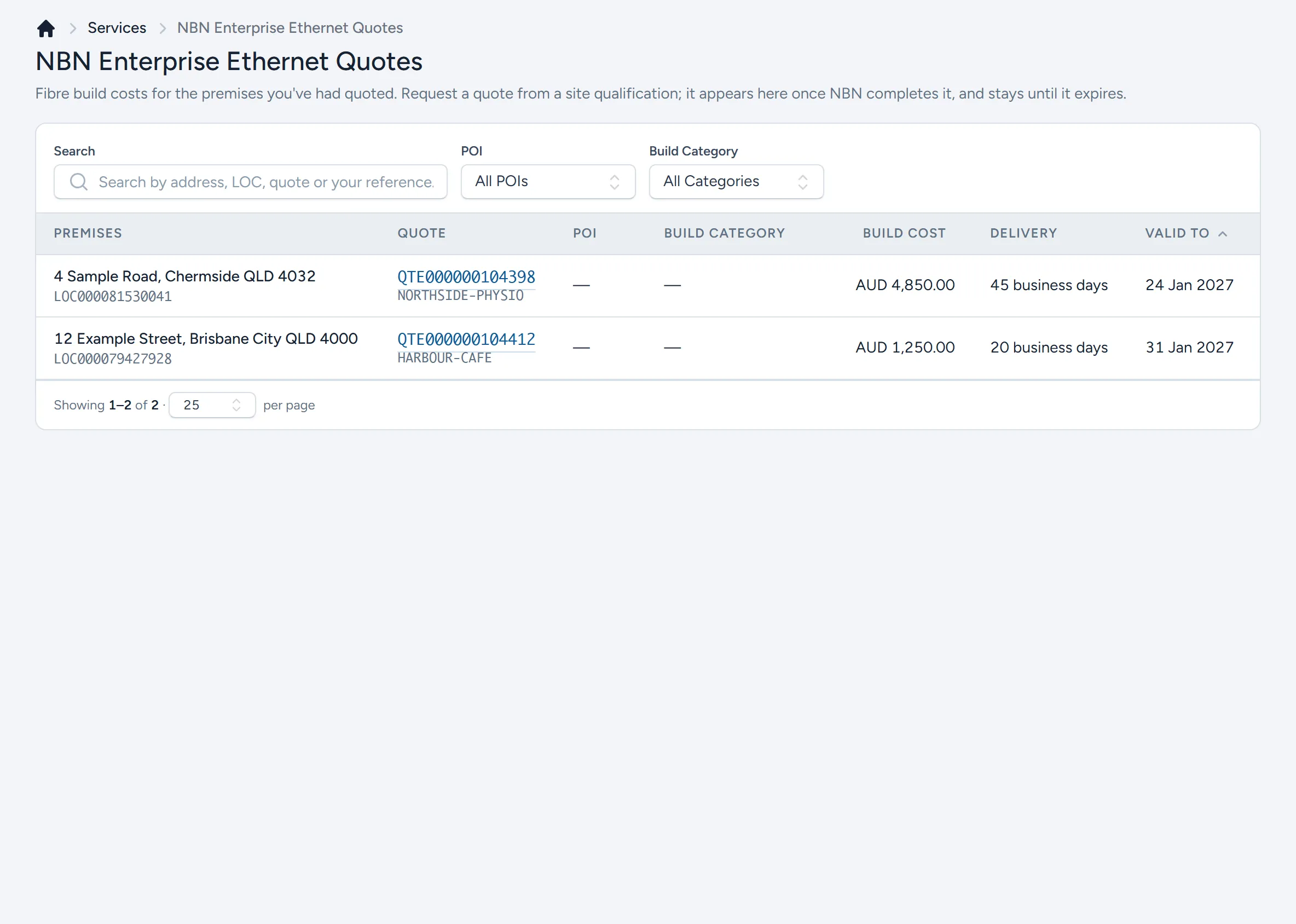
| Column | What it shows |
|---|---|
| Premises | The address, with its NBN location ID (LOC) under it. |
| Quote | NBN’s quote ID, with your own reference under it if you gave one. |
| POI | The point of interconnect the premises is served from. |
| Build Category | NBN’s fibre build category for the premises. |
| Build Cost | The fibre build contribution, excluding GST. |
| Delivery | NBN’s estimate of how long the build takes once the order is accepted. |
| Valid To | The last day you can order against this price. |
Select a quote ID to open the quote. Its page shows the build cost, build category, delivery estimate and validity. It shows the premises: address, LOC, POI, zone and region. It also shows when the quote was requested and priced. Site Qualification opens the premises’ site qualification. View Quote on the SQ card opens the same page.
A quote leaves the list when it expires. Request a new one for that premises if you still need it. Until a quote is priced it isn’t listed here. Follow it on the SQ card instead.
The build cost is shown at our cost. It is not charged from the quote.
Partners can’t see NBN Quotes.
From the API, GET /nbn/quotes lists the same quotes, and
GET /nbn/quotes/{quoteId} reads one in any status. See the
API reference.
If something is wrong
| What you see | What to do |
|---|---|
| “Could not request a quote — try again in a moment.” | NBN’s system didn’t answer. Try again in a few minutes. |
| A quote has been pending for more than an hour. | We are told about it too and chase it with NBN. Raise a provisioning ticket if you need it sooner. |
| A quote you were given offline isn’t on NBN Quotes. | Ask support to attach it to your account. |